Pages

Thursday, November 28, 2013

Happy Thanksgiving


Happy Thanksgiving to all my dedicated followers. I hope you're having a wonderful Thanksgiving.
I have put a list of sale items for black Friday just in case you decided to do some shopping with big saving. Enjoy and have a blast. XOXO


Kate Spade is offering up to 75% off brand items.
J.Crew is offering 30% off with code HOLIDAY.
West Elm is offering 25% off everything with code STOCKUP. 
C.Wonder is offering 30% off 3+ items with code GIFTS30.
Nordstrom is offering 25% off select brands.
Bloomingdales is offering 50% off select brands.
Ann Taylor is offering 50% off with code ANNTHANKS.
Pottery Barn is offering free shipping and monogramming on holiday decor.
ASOS is offering 20% off with code GIMME20.
Serena & Lily is offering 20% off with code THANKS20.

Macy's is offering special savings sitewide.
Shopbop is offering 15% off orders of $250+, 20% off of $500+, and 25% off of $1000+ with code BIGEVENT13.
Tory Burch is offering 20% off orders of $300+, 25% off orders of $500+, 30% off orders of $750+ with code HOLIDAY.

Sunday, November 10, 2013

iMovie 10 - Recording voice

iMovie – How to record voice over in iMovie in Version 10


“I just updated my iMovie to Version 10 using Mavericks operating system on the Mac and now I can’t find the microphone button to record voiceover for my videos.”
iMovie was recently updated with the release of Mavericks (OS X 10.9+).
In the previous version of iMovie the Voice button was located in the front line and well, you knew what the icon was.
imovie-voice-over-button
With the recent iMovie update to Version 10 the voice over button is no longer visible but you can get to it very easy. To quickly access the voice over option in iMovie press the ‘V’ on your keyboard while you have a project open or go over to the option by going to the iMovie menu bar, select ‘Window’ and scroll down to ‘Voice’.
imovie-voice-button-versioin-10

How to record voice over in iMovie:
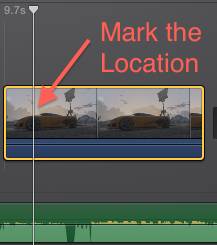
Click on the location you want to begin recording Audio. You can do this by simply clicking on 
the location of the video clip.
imovie-voice-over-mark-location
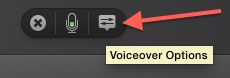
If you’re using an external microphone click on the Voice Options button to select it.
imovie-voice-over-options
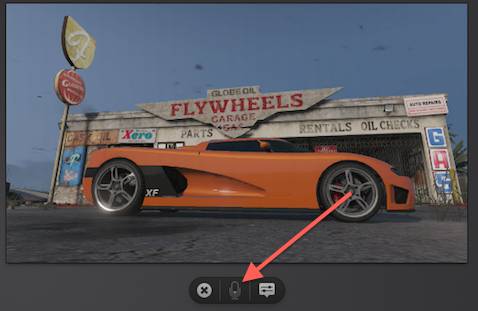
With the location marked you can now press the Voice over button to begin recording. A countdown timer will appear to let you know when to begin. To stop recording press the ‘Spacebar’.
imovie-voice-over-button-close-up

Thursday, November 7, 2013

Thursday Wear

Cable Knit Sweater: Vinyard Vines  Camel 
Skirt: Level 99  
Flower Pin: Ban.do  
Two tone Handbag: Lavand  
Accessories: Kara Ackerman
Cable Knit Sweater: Vinyard Vines
Camel Skirt: Level 99
Flower Pin: Ban.do
Two tone Handbag: Lavand
Accessories: Kara Ackerman
- See more at: http://www.annexmagazine.com/category/all-posts/#sthash.iwW2gwty.dpuf